My game, I Can Hear Them Coming, was recently showing in an episode of IGN and Rogue Game’s Rogue Jam show.
I don’t really have much to say about the experience, as my participation was limited (though don’t let that imply that my excitement was limited…I was, and still am, incredibly excited to have been a part of this). The process was pretty straightforward. 1) I entered the contest. 2) I got an email saying that my game moved on to the next round and that I need to submit some clips of me answering a list of questions, 3) Episode 1 of show goes live on YouTube, and there I am. Unexpectedly seeing my game on the show was surreal, for sure.
While my game didn’t win (and, for the record, I agree with the judges in choosing other games), that won’t stop me from pretending that I have kinda, sorta shared a stage with Reggie Fils-Aimé, Peer Schneider, and Daemon Hatfield.
For anyone who wants only the Caleb bits, go to minutes 3:27 and 4:50 of the video, linked below.
I recently completed an animation course in Blender. I have no plans to use Blender animations in my games.
My Blender learning journey has been one so far focused on modeling, shading, and UV texturing. Soon I’m going to start sculpting. All of these focuses are applicable to the game-making journey I’m traveling right now. But animation…well, I’m either building a game that doesn’t use animations or, more likely, I’m avoiding making a game that uses animations because animations are effing intimidating.
I have some history with animation. In college, I created a Flash cartoon series called The Thirsty Gerbil Super Things (check out this one episode that still survives), recently I completed a short Unity animation course (focused on the Mecanim system), and even more recently I completed an animation section in a very popular 3D modeling course. What I’ve learned from the latest Unity and Blender courses is that animation is really hard and when something goes wrong, knowing how to fix it is pretty hard. Usually I have to start over.
I know that learning animation in Unity is going to be very important eventually (and is probably very important now, but again, I’m fighting hard to avoid having to actually master animation).
But how exactly does animating in Blender relate to animating in Unity? I don’t know. The Blender animation course that I recently took doesn’t describe how to get Blender animations into Unity, meaning my practical use for the learnings is far removed.
So why not just skip the animation section? Because I’m afraid that without taking the course in the proper order I’ll miss the required knowledge for advancing through future courses. Also, if I skipped the animation course, I will have missed out on creating the very cool animation above.
So, to summarize:
I know learning animation is important
I’m intimidated by learning animation, so I’m avoiding it as much as possible
I have no practical use in mind for animation, which supports my aversion
Looked forward to a future devlog where I inevitably dismiss animation as “super easy”
One of the best TV shows of all time is Reno 911. It’s a mockumentary style series in which a squad of inept police officers in Reno, Nevada are followed around by a camera crew for…some reason. [1]btw, I am super happy that the mockumentary genre has so far avoided needing to justify the cameras. Somehow, this complete refusal to acknowledge the occasion, and instead fall hard into the ego … Continue reading
One of my favorite skits involves an apartment fire. A panicked tennant tries to convince police officers and firefighters to brave the burning building in order to rescue the only copy of his in-progress novel. This man’s life work is about to be destroyed.
This scene is a potentially heavy one wrought with questions about the frailty of a human being’s contributions to a world always trying to destroy them. Think about it: in one instant, this person’s entire record of being, his legacy, could disappear completely. In a way, destruction of a legacy is even more daunting than destruction of one’s own life. A legacy is forever. A life isn’t.
Instead, Reno 911, being a comedy show, pauses to allow the police officers and firefighters to consider the merits of the novel before deciding whether or not to rescue it. This forces the novelist to defend his work…which he simply cannot do. Over the course of the skit, the officers and firefighters ask questions that the author cannot answer. Simple questions about the book’s plot are met with the author’s deflated attempts to rationalize the book’s hackneyed themes. In the end, we see the author learn a valuable lesson, as spoken by one of the firefighters: “If you can’t get excited about your work, how can you expect anyone else to?”
If you can’t get excited about your work, how can you expect anyone else to?
This is advice I’d received in college (as I pursued an English Literature degree), but never really processed. Well, I guess I processed it, but in a way that I don’t think the advice intended.
In college, I took this advice to mean that everything I create should be so different and so creative that its novelty alone would inspire passion in both me and the audience. I reasoned that it’s easy to get excited about my work when the work itself is so…out there. And this worked…for me. For the audience? Not always. I was passionate, sure, but I was passionate for an idea that was difficult for an audience to care about. In other words, my passion was not contagious. The audience had no reason to engage with it.
Rather, the advice means something else, I think. It means that a creator should not avoid convention; a creator should instead be able to get excited about conventions and genre tropes. A creator should understand why conventions and genre tropes work and should use their creativity not to avoid conventions but to accept them for what they are and to build something special with them.
The novelist in the Reno 911 skit immediately deflated when asked to defend his work. He collapsed amid accusations of trite storytelling. Instead, he should have embraced the accusations. He should have defended his creative choices and his role in writing a novel that fits within expected genre tropes.
I think about this often when designing games. Sometimes I worry about “creating yet another platformer” or “creating yet another game with a humanoid player character.” And so I have to remind myself that platformers are great, that humanoid characters are great. The sign of a creative game maker with eyes toward a legacy isn’t about creating something brand new from nothing, but is about something so much harder and ultimately more worthy of praise: creating something brand new from something. Because with “something” comes expectations and opinions, and navigating those expectations and opinions to emerge on the other side with a product people love, now that’s something to get excited about.
btw, I am super happy that the mockumentary genre has so far avoided needing to justify the cameras. Somehow, this complete refusal to acknowledge the occasion, and instead fall hard into the ego mania of the situation, is funnier than any contrived justification could ever be.
The credits are rolling on Final fantasy 7 remake and I loved it… But maybe for reasons you don’t expect
I avoided playing Final Fantasy VII Remake for a long time. But not because of some unhealthy affinity for the original. I believe change is almost always good. Loving something isn’t a reason to keep that something from evolving into something else. That’s basically Munchhausen syndrome by proxy. You know, that mental condition whereby a healthy person is tricked by a crazy person into feeling unhealthy. By loving the original Final Fantasy VII to the exclusion of Final Fantasy VII Remake you’re defining something so specifically that it depends on you in order to be relevant. That’s a selfish outlook. (more…)
Video games are great. Learning from our ancestors is great. So shouldn’t our descendants have access to the greatness of today’s video games?
In this video I talk about video game preservation. Why is it important to preserve both physical video games and digital video games? How you can help preserve and archive video game culture?
I like button-mashers. Give me a retro style 2D beat ’em up or an arcade fighting game and a game controller, and I’m happy as a clam…with thumbs. A clam needs thumbs to play video games. A thumbless clam on a game controller is just a crustacean exploring a kink. I get it. I’m not shaming the clam. Or the controller. They are probably incredibly happy together.
But my happiness regarding thumbs and games is limited, specifically because my happiness is directly proportional to the skill required by said games. In other words, with 2D beat ’em ups and fighting games, I’m happy as long as I can mash buttons with relative abandon. But make me learn intricate combos, and quickly I become a sad clam. Nothing will change that.
But, people love games with crazy input combinations. And people can get really good at those games. How? Well, there are a lot of reasons, but one thing I want to focus on in this video is the idea of how really smart game designers use mental models to influence button input patterns. Basically, how do the buttons themselves, these Crosses and Squares and Xs and Ys, their colors, their relationship to each other, how do these buttons help a player to get comfortable playing a game and therefore encourage the player to enjoy the gaming experience? How can so many button combinations not feel overwhelming?
Mathematically speaking, how complex are video game move sets?
First, let’s establish a way to calculate complexity so we can measure how complexity changes from game to game. A simple equation I like to use is: Verb × nouns x context = complexity. Each verb times the count of nouns that can interact with that verb times the number of scenarios that verb can be used in, all summed together, indicates how complex a game’s move set is and therefore how complicated it could be to map all those moves to a gamepad.
Let’s look at a game most people know, at least from my old-man perspective most people know this game. Super Mario Bros. 3 on the NES. And to make things simple, let’s look at just one verb: throw.
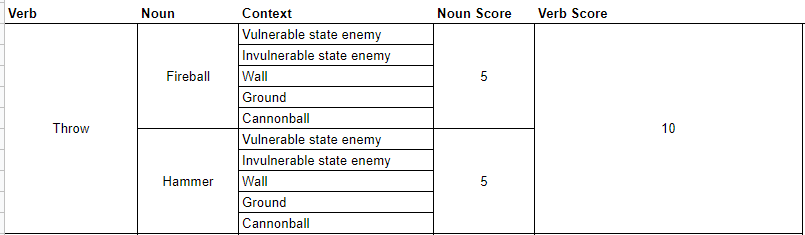
In the case of Super Mario Bros. 3, the number of nouns that can interact with that verb is really just two. The verb throw can interact with
fireballs
hammers.
Now, for each of those nouns, we count the number of different contexts Mario can use these verb + noun combinations.
Throwing a fireball at a vulnerable enemy kills that enemy while also snuffing out the fireball.
Throwing a fireball at an invulnerable enemy maintains that enemy while also snuffing out the fireball.
Throwing a fireball at a wall causes that fireball to snuff out.
Throwing a fireball at the ground causes the fireball to bounce forward.
Throwing the fireball at a cannonball while on one of the flying ships allows the fireball to pass through the cannonball.
I’m sure there are more interactions but let’s stop there. With this one verb x noun x context pairing, we’re at a complexity score of 5.
If we run the same equation using the hammer, we also must apply it to the same contexts as other throwable nouns, meaning we have another 5. 5 + 5 = 10.
Super Mario Bros. 3 Throw Verb Score
Altogether then the throw verb score is 10 and the cumulative complexity score is also 10, because, again, we’re only dealing with one verb in this example. If we were to take the time to account for all of Mario’s various verbs, nouns, and contexts we’d have a much higher number, but we don’t need to go further because that’s not the point here. The point is, a formula exists for showing the degree of complexity regarding character interaction mechanics.
So how is it that games like Super Mario Bros. 3 can have such a high complexity score but not actually feel that complex when playing?
Humans are really good at generating mental models. Mental models are systems of understanding the world around us. Going back to Super Mario Bros. 3 for example, the player character cannot move through green pipes. Neither can fireballs. Therefore, the player can assume that all surfaces which reject Mario world also reject fireballs and by extension would also reject other thrown nouns. These assumptions make up our mental model of the game. The beauty of a mental model is that by using one we don’t have to tax our brains with checking the behavior of every wall, every floor or every brick. Our mental model accounts for those things.
Important to note though is that mental models can adapt quite easily. Staying with Super Mario Bros. 3, the thrown hammer interacts with wall and floor objects differently than fireballs do. Having learned that, the player’s mental model adapts.
So what’s the point of all this?
I’ve been playing a lot of Marvel Spider-Man Miles Morales lately. Along with its predecessor, Marvel Spider-Man, these two games have a much, much higher complexity score than Super Mario Bros. 3. I did some quick math regarding Marvel Spider-Man Miles Morales and arrived at a complexity score of 96.
You’ll have to trust me. There are a lot of nouns and verbs in Spider-Man games, okay!
And that’s just when considering only combat verbs and only as stand alone actions. In the Marvel Spider-Man games, pressing multiple buttons simultaneously or holding buttons for specific durations of time further stretch what our verbs can do meaning the true complexity score would be exponentially higher, and I didn’t feel like trying to calculate it, so you’ll just have to trust me on this quest.
But despite this complexity the game doesn’t feel that complex when playing. Control inputs feel intuitive. Character reactions to control inputs behave in an expected manner.
How do game designers take games with such a high degree of input complexity and make those games feel intuitive?
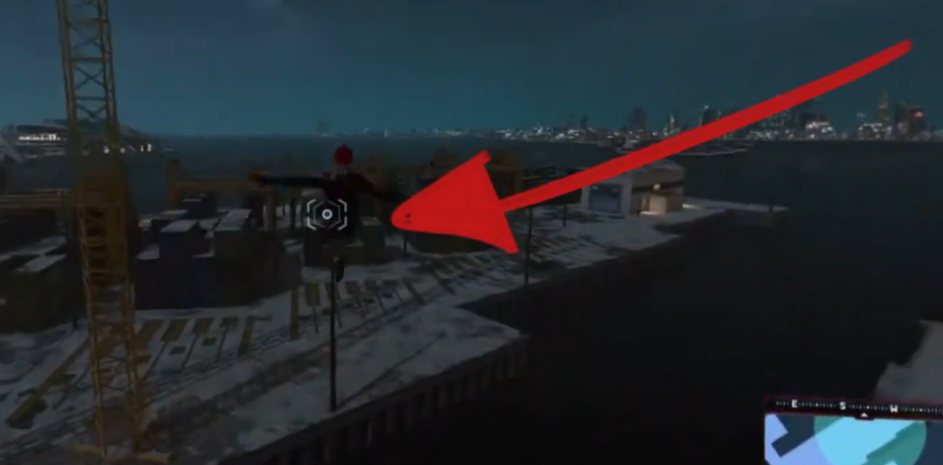
The Marvel Spider-Man Games use a lot of different techniques to inform the player’s mental model. For example, the environment itself leverages constraints to highlight when contextual actions are relevant. Such is the case with the zip-to reticle which is only visible when that action is possible.
The zip-to reticle never outstays its welcome.
But for the remainder of this video, I want to focus on how Insomniac games has brilliantly used the PlayStation 4 Dual Shock gamepad itself to inform our mental model.
Certain buttons own certain categories of behavior
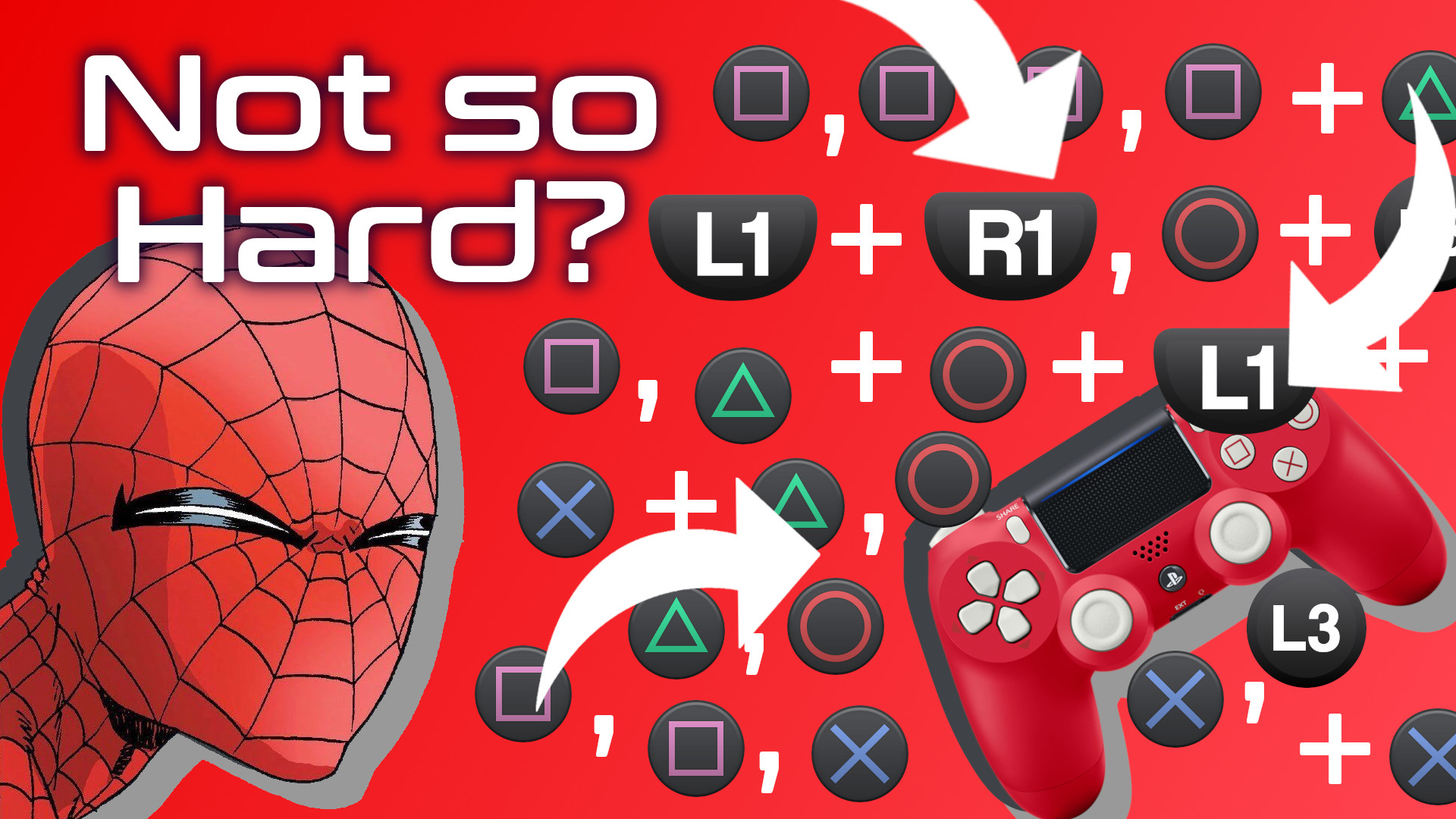
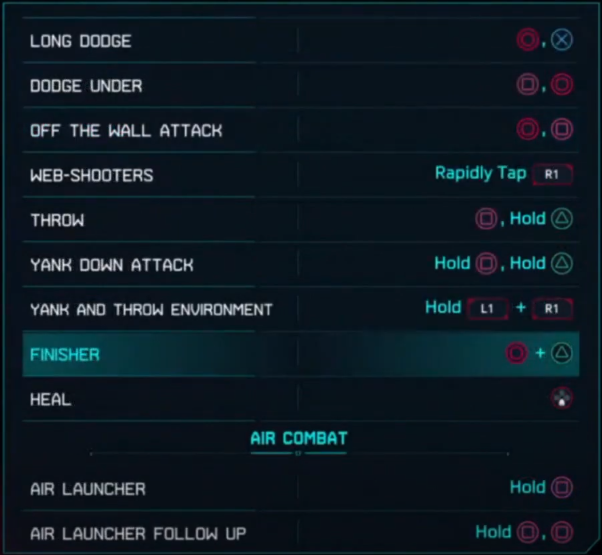
A player cannot be expected to remember every button action and combo through rote memory. Look, there are a lot of combinations. Pressing Square a bunch of times in a row is easy enough, but what about Circle then Cross or Square then Circle, and what about throwing L1 into the Square + Cross mix. On paper, it seems things could get quite complicated.
And this is just one a portion of the move set!
So how do they do it? In part, Insomniac games has designed button inputs to own categories of behavior. The player learns that the Triangle button, for example, is used to close gaps. Pressing triangle near an enemy will always serve some some of “gap closing” action, in one of the following ways:
by pulling the enemy close to Spider-Man
by pulling the enemy’s weapon close
by pulling Spider-Man toward the enemy.
The game never explicitly tells the player that the Triangle button can be thought of as a gap-closing button. Rather, the game simply tutorializes specific use cases, such as “tap Triangle to perform a web-strike.” And with consistent use and feedback, the player begins to intuit this gap-closing functionality, and once it becomes part of the player’s mental model, it becomes easier to understand how the Triangle button will impact other categories of behavior owned by other buttons. So matter what, if the triangle button is used in combination with another button, there will be some element of gap-closing. The player only needs to remember a button’s general domain, not every possible combination that uses that button. It’s pretty incredible what Insomniac has done.
This works for all of the face buttons. The Circle button is used for creating distance, most often as a dodge. The Cross button is used for jumping. The Square button is used for offensive maneuvers, mostly kicks and punches. And the L1 button is used to trigger special Venom powers. Therefore, as long as I have a general idea of what I want Spidey to do, I can do so consistently and confidently without having to rely on rote memorization.
And, since we’re on the topic of Venom powers, let’s explore the second way Insomniac uses the gamepad to inform our mental model.
Gestalt Theory
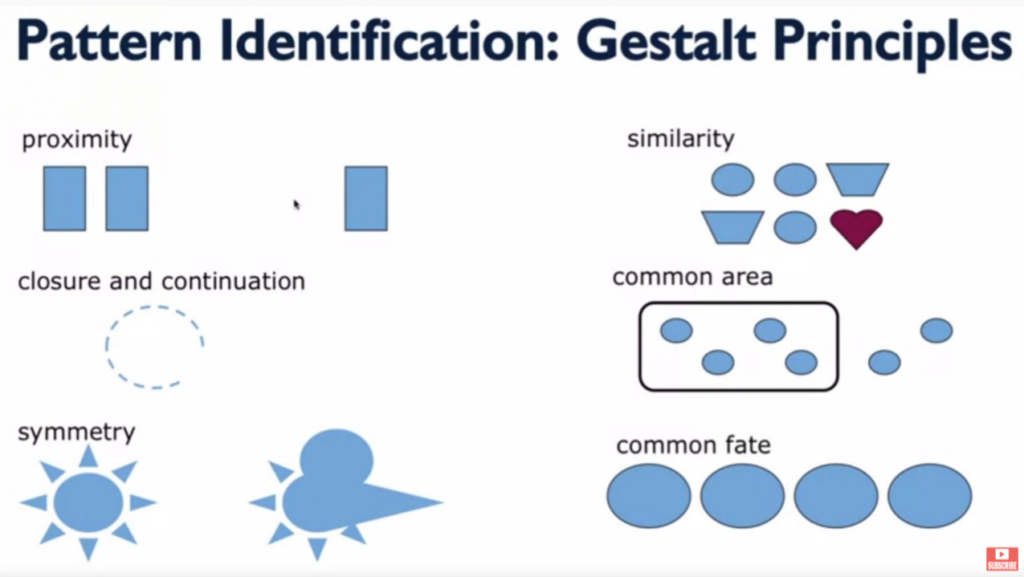
There’s a theory of design called Gestalt Theory which factors in six individual principles: similarity, continuation & closure, proximity, common area, symmetry, and common fate. Essentially, these principles help users understand the relationships between various elements.
What’s important for us is that the formal differences between buttons as well as the proximity some buttons have helps the player understand how those buttons work together or don’t work together.
Shoulder buttons, for example, are physically distant from face buttons, they are different shapes, and on some gamepads they have different textures. Gestalt principles of design clue the player into the functional differences of these button groups. Smart game designers lean into that mentality. They don’t fight against it. It’s also worth noting that the limitations of the human hand also factor into which buttons will own which functionality.
Human hands are great…but not that great.
That’s why with Marvel Spider-Man Miles Morales the face buttons are the only buttons that affect Spider-Man’s positioning and hit-box, in most contexts. The shoulder buttons change the player’s perspective of Spider-Man or his appearance, but they don’t actually change his position, in most contexts. Similarly, the d-pad controls don’t move Spider-Man, rather they augment him in some way. Each group of buttons owns generally exclusive behaviors.
There’s also a balance that Insomniac has to maintain between honoring Gestalt principles and honoring the conventions that gamers expect. Thankfully, because smart designers have been designing smartly for years and because those designers likely know of Gestalt principles, there’s considerable overlap between what the player has come to expect based on playing lots of games and what Gestalt principles indicate the player probably expects.
Once the player’s mental model adapts to the understanding that face buttons function differently than shoulder buttons, and those in turn function differently than d-pad buttons, the player’s experience starts to feel intuitive. And remember, the game never explicitly tells the player about these functional categorizations. Smart design simply reveals it to the player. That’s incredible.
Lastly, and I’ll admit, this one is a bit of a stretch, the face buttons, the buttons that physically move Spider-Man most often, are anthropomorphic.
Anthropomorphic Button Layout
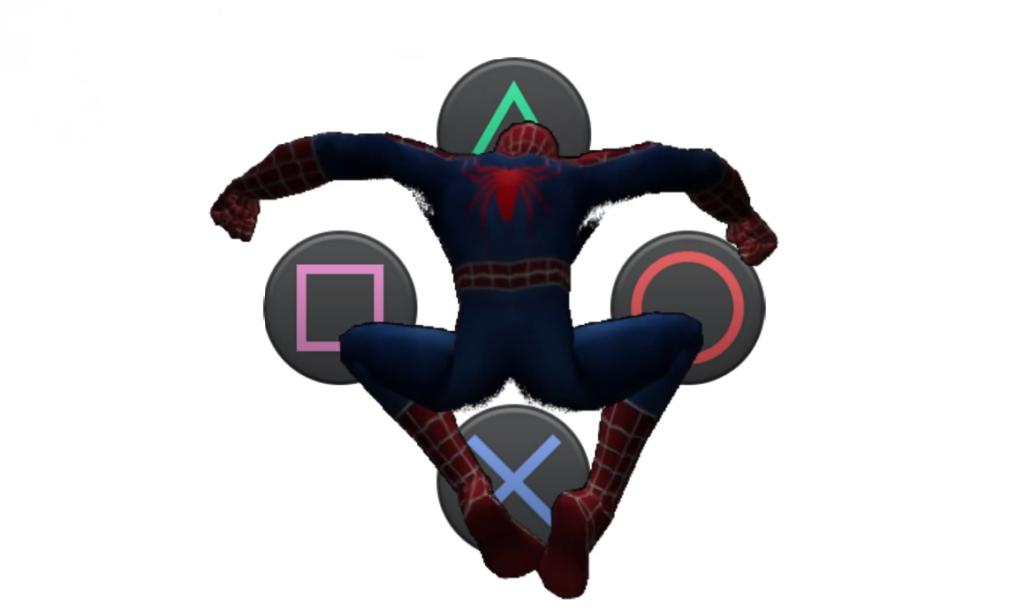
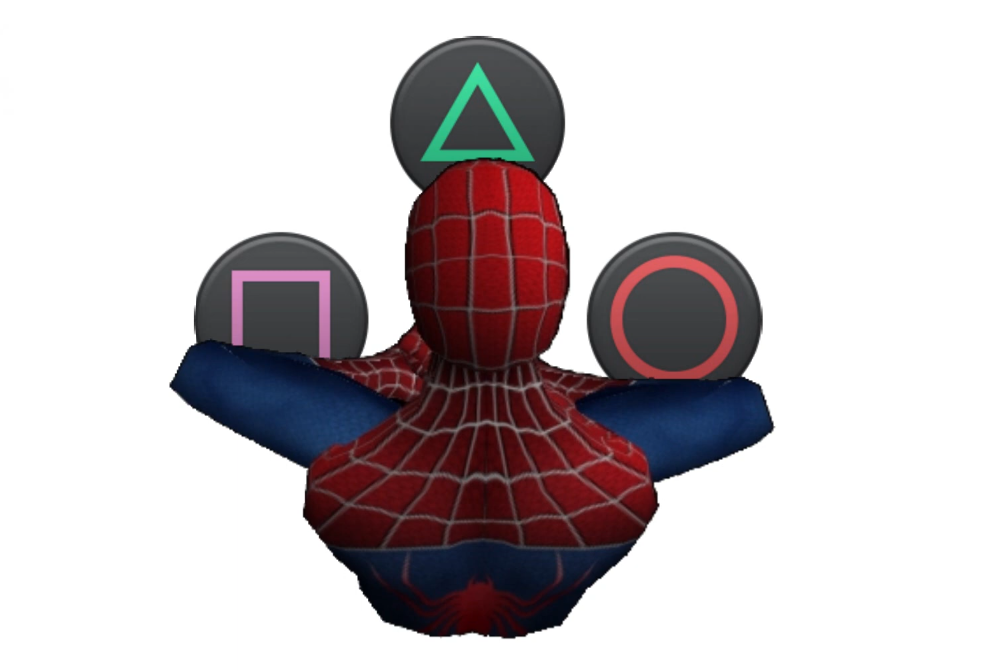
In other words, the face buttons take on the same human-like characteristics as does the human-like Spider-Man. Imagine this, you take the PlayStation 4 Dual Shock controller face buttons and overlay them with an image of Spider-Man. It would be reasonable, then, for a player to begin to understand the t-shape of the face buttons as mapping rather elegantly to the t-shape of a human body, or in this case the compressed, lower-case t-shape of spiderman perched on something. Through that lens, the cross button makes sense for an action that involves the feet, an action like jumping. Circle makes sense as a means for pushing Spider-Man away from the center axis of his body, much like a dodge would do. The Square button makes sense as a punch button specifically, but an attack button more generally, and the Triangle button, being at the top, makes sense as a means for bridging gaps, especially if you think of the face buttons from an overhead perspective, in which case triangle would be the button between Spider-Man and an enemy.
You can’t unsee it.See, the Triangle really is supposed to be a view cone.
And much like the Gestalt principles mentioned earlier, anthropomorphizing the face buttons has the added benefit of adhering to conventions. With PlayStation games, Cross is generally mapped to jump and Circle is generally a cancel button, and dodging feels like a cancel-style maneuver, as in I’m wanting Spider-Man to cancel out of whatever confrontation he’s in the middle of.
Like I said, that last method about anthropomorphizing the face buttons may be a bit of a stretch, but I think it makes sense. In fact, I dream of a day I could ask the designers at Insomniac games if there’s any truth to my hunch.
During a recent usability review playtest of an in-progress video game, I noticed something strange about the way the main menu registered gamepad inputs. This led me down an especially nerdy path to better understand what was going on.
I recently conducted a usability and gameplay analysis of an in-development game called Dungeon in a Bottle. It’s a 2D precision platformer and is absolutely delightful.
One focus of my analysis was the menu system. The developer, Very Handsome Games, called specific attention to the menu system as something they’d like me to take a look at. So I did. I look at things that people want me to look at. It’s who I am. It’s also why driving down a billboard-filled highway can be dangerous for me and any of my passengers. Billboards are meant for looking at.
When you’ve been playing video games with an eye toward usability for as long as I have, you start to intuit things on a gut level without having to rely on a checklist of usability heuristics. In the case of the Dungeon in a Bottle menu system, something felt a bit off. But I couldn’t articulate it, so I kept on with my play session. Later in the game, I noticed that a particular mechanic, called a Moth Jump, depended on button presses during specific intervals of time that, for some reason, perhaps my own ineptitude, I couldn’t quite land consistently.
The issue I found with the menu system is that when changing from one menu item to another using a gamepad it was possible, and actually quite common, to cycle so quickly through the menu options that landing on a specific option was difficult.
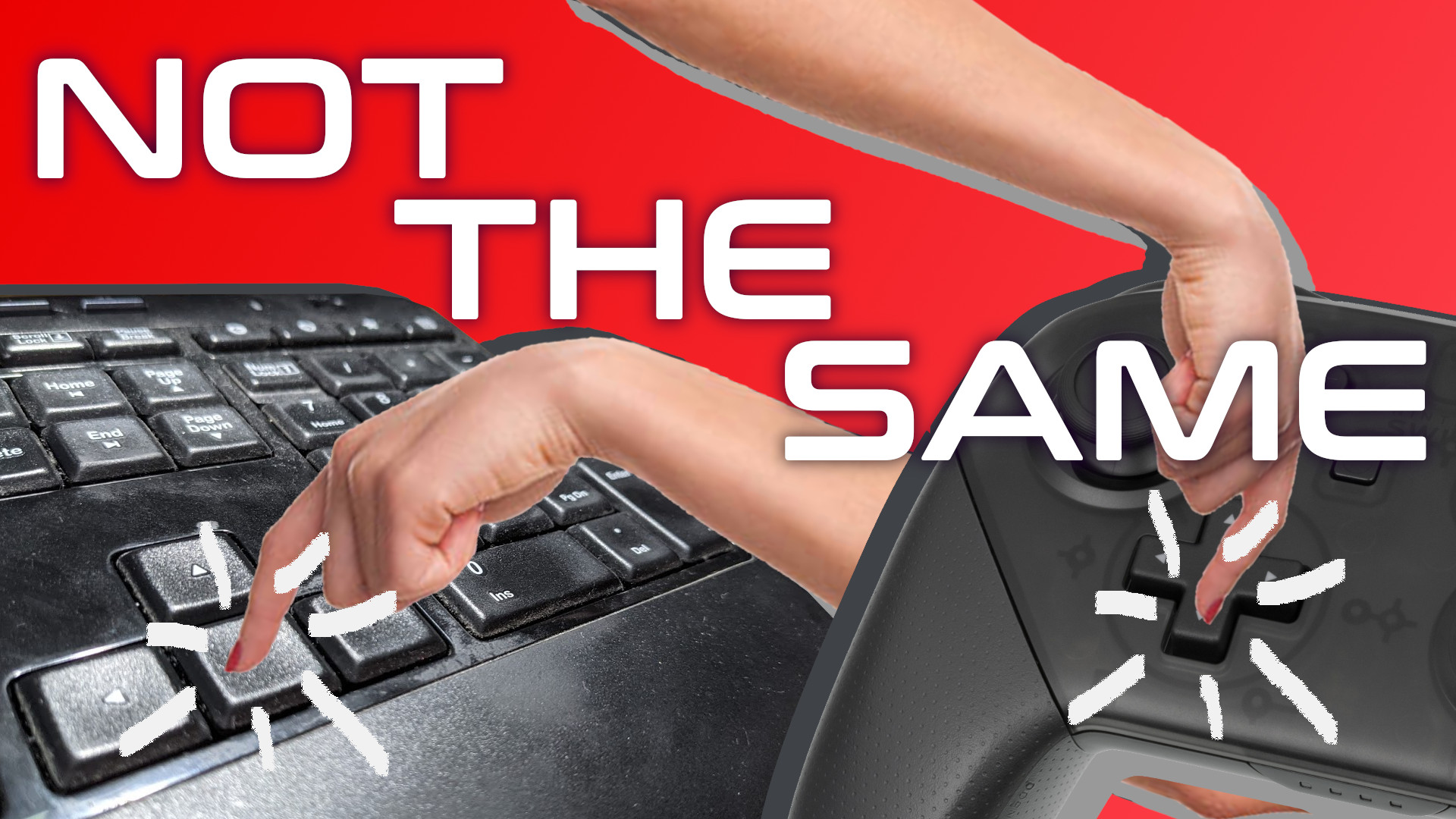
So, I had a theory worth testing: Are gamepad button presses less instant than keyboard button presses? Do players tend to hold gamepad button presses longer than keyboard button presses for the same objective?
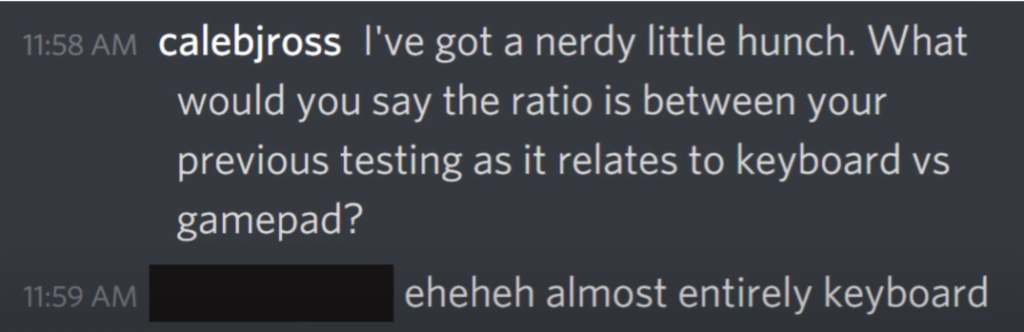
Well, first I wanted to better understand Dungeon in a Bottle’s own playtesting measures. I reached out to the developer and asked them to validate a hunch that the game’s testing so far had been focused on keyboard input. They validated this hunch. Nice.
Validation feels nice.
But a hunch alone wasn’t enough. I needed data. So, I mocked up a menu system to test this theory. I used a menu system both because that’s the situation that initially churned my gut, but also because it’s a testing environment that eliminates skill-based variables. I needed to remove as many variables as I could because I don’t have access to a fancy lab with lots of eager test participants. No, I have access to a smelly room and just three less than eager family members.
So, I have the test environment, I have the testers, and with a quick script to count frames during button presses, I have my data stream. Each session went like this: I had the player sit in front of the screen. I then instructed them to pick up the controller. I told them that the d-pad should be used for this test. I wasn’t testing how intuitive the interface was, afterall. I was testing for frame counts. So I felt comfortable directly telling the player how to navigate the menu. I then gave them a simple set of instructions to follow. For example, go down to the exit option. Now go up to the color option, now go back down to the exit option, and on and on until the player had pressed an average of 28 buttons. I then had them do the same for the keyboard.
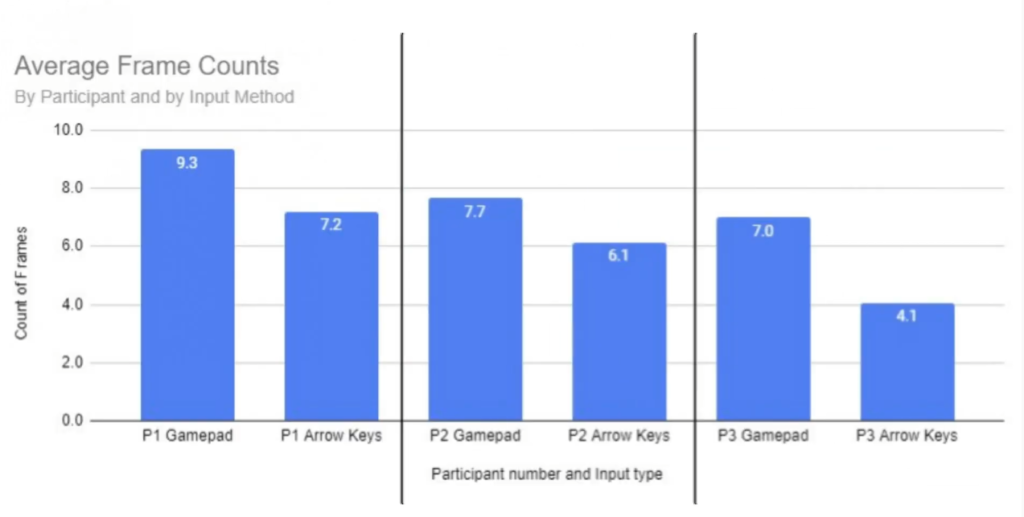
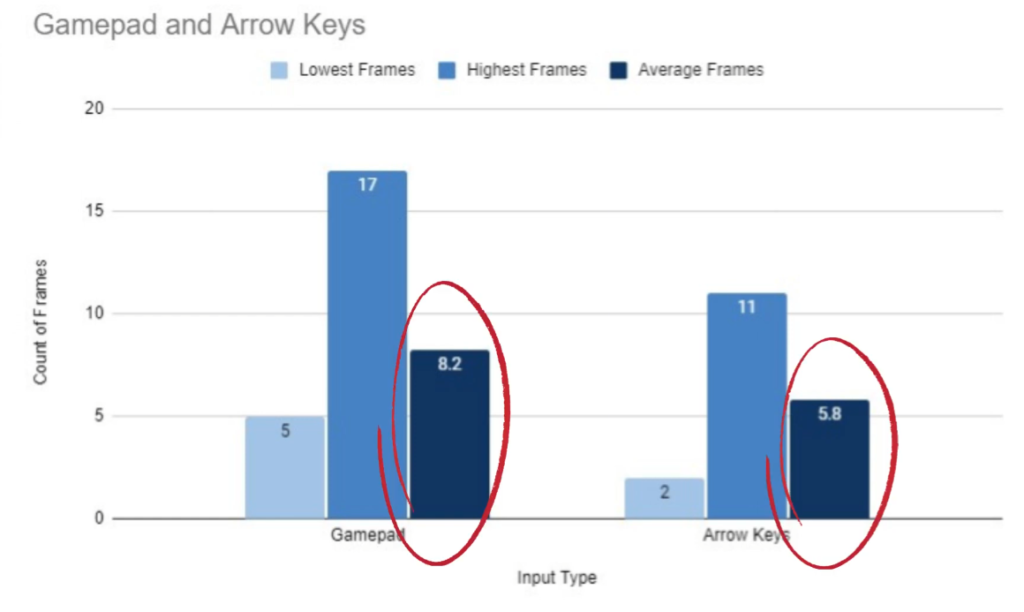
Afterwards, I had some data. Average frame counts are higher for gamepad button presses:
And this average is consistent even at the individual participant level:
Sure, this data isn’t enough to be statically valuable, but it’s definitely enough to add some credence to this idea that gamepad directional buttons tended to be pressed for longer durations than keyboard arrow keys.
Practically speaking, how is this useful? First, and perhaps most importantly, it means Bob’s thoughts about the “instant and satisfying” nature of keyboard button presses is valid from slightly more than just a subjective perspective. Second, it means that any coding in the game that relies on specific button states may need to take this input-based player behavior into account. Now, I have not talked with Very Handsome Games specifically about how they coded the game, so from here on out I’m only relying hypotheticals that could be applied to any game.
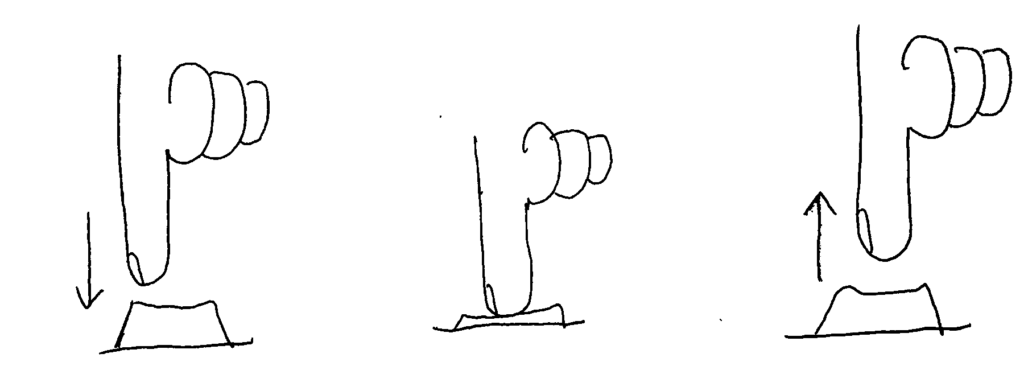
First, know that there are three states that a button can be in. In Gamemaker Studio 2, the engine that I’m most familiar with, these button states are:
check_pressed, which checks to see if the button has been pressed
check, which checks to see if the button is currently down
check_released, which checks to see if the button has been released
GameMaker Studio button states: _check_pressed, _check, _check_released
If cycling through the menu is based on the check function, then knowing that gamepad users hold buttons longer means that those players may inadvertently cycle past the desired option. Perhaps replacing this with the check_pressed function would be better, as this would allow the menu selection to advance only once per button press. However, for games with very long menus, this would force the player to press a button many times instead of just holding the button. Think the way Contra on the NES is way less problematic when using a turbo button. In this scenario, the check_pressed function is probably the right way to go, but some additional logic might be called for Perhaps the developer would want to incorporate a timer to allow the selection to advance only after a set number of frames has passed. According to the lowest frame count capture for a gamepad in my study, that number would be five frames. The developer could also have these rules be separate for gamepad and keyboard users if they really wanted to cater to specific gaming habits.
Overall, I’m really happy with this finding. Again, it’s not statically valuable, but it is incredibly interesting, to me at least, as it further helps me understand the differences between gamepad and keyboard inputs. Too often I think of the two interfaces as entirely preference based. I don’t think of them often enough as different in terms of functionality, at least not with games that are limited to very simple mechanics and few button requirements.




 And this average is consistent even at the individual participant level: