The credits are rolling on Final fantasy 7 remake and I loved it… But maybe for reasons you don’t expect
I avoided playing Final Fantasy VII Remake for a long time. But not because of some unhealthy affinity for the original. I believe change is almost always good. Loving something isn’t a reason to keep that something from evolving into something else. That’s basically Munchhausen syndrome by proxy. You know, that mental condition whereby a healthy person is tricked by a crazy person into feeling unhealthy. By loving the original Final Fantasy VII to the exclusion of Final Fantasy VII Remake you’re defining something so specifically that it depends on you in order to be relevant. That’s a selfish outlook. (more…)
Video games are great. Learning from our ancestors is great. So shouldn’t our descendants have access to the greatness of today’s video games?
In this video I talk about video game preservation. Why is it important to preserve both physical video games and digital video games? How you can help preserve and archive video game culture?
I like button-mashers. Give me a retro style 2D beat ’em up or an arcade fighting game and a game controller, and I’m happy as a clam…with thumbs. A clam needs thumbs to play video games. A thumbless clam on a game controller is just a crustacean exploring a kink. I get it. I’m not shaming the clam. Or the controller. They are probably incredibly happy together.
But my happiness regarding thumbs and games is limited, specifically because my happiness is directly proportional to the skill required by said games. In other words, with 2D beat ’em ups and fighting games, I’m happy as long as I can mash buttons with relative abandon. But make me learn intricate combos, and quickly I become a sad clam. Nothing will change that.
But, people love games with crazy input combinations. And people can get really good at those games. How? Well, there are a lot of reasons, but one thing I want to focus on in this video is the idea of how really smart game designers use mental models to influence button input patterns. Basically, how do the buttons themselves, these Crosses and Squares and Xs and Ys, their colors, their relationship to each other, how do these buttons help a player to get comfortable playing a game and therefore encourage the player to enjoy the gaming experience? How can so many button combinations not feel overwhelming?
Mathematically speaking, how complex are video game move sets?
First, let’s establish a way to calculate complexity so we can measure how complexity changes from game to game. A simple equation I like to use is: Verb × nouns x context = complexity. Each verb times the count of nouns that can interact with that verb times the number of scenarios that verb can be used in, all summed together, indicates how complex a game’s move set is and therefore how complicated it could be to map all those moves to a gamepad.
Let’s look at a game most people know, at least from my old-man perspective most people know this game. Super Mario Bros. 3 on the NES. And to make things simple, let’s look at just one verb: throw.
In the case of Super Mario Bros. 3, the number of nouns that can interact with that verb is really just two. The verb throw can interact with
fireballs
hammers.
Now, for each of those nouns, we count the number of different contexts Mario can use these verb + noun combinations.
Throwing a fireball at a vulnerable enemy kills that enemy while also snuffing out the fireball.
Throwing a fireball at an invulnerable enemy maintains that enemy while also snuffing out the fireball.
Throwing a fireball at a wall causes that fireball to snuff out.
Throwing a fireball at the ground causes the fireball to bounce forward.
Throwing the fireball at a cannonball while on one of the flying ships allows the fireball to pass through the cannonball.
I’m sure there are more interactions but let’s stop there. With this one verb x noun x context pairing, we’re at a complexity score of 5.
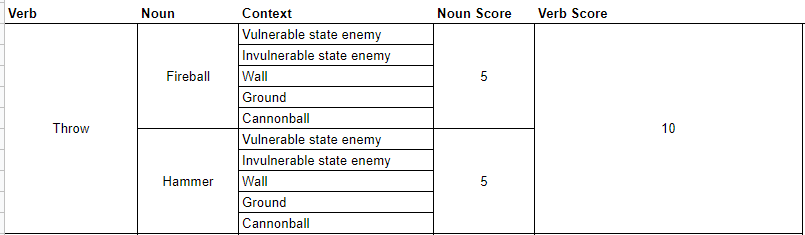
If we run the same equation using the hammer, we also must apply it to the same contexts as other throwable nouns, meaning we have another 5. 5 + 5 = 10.
Super Mario Bros. 3 Throw Verb Score
Altogether then the throw verb score is 10 and the cumulative complexity score is also 10, because, again, we’re only dealing with one verb in this example. If we were to take the time to account for all of Mario’s various verbs, nouns, and contexts we’d have a much higher number, but we don’t need to go further because that’s not the point here. The point is, a formula exists for showing the degree of complexity regarding character interaction mechanics.
So how is it that games like Super Mario Bros. 3 can have such a high complexity score but not actually feel that complex when playing?
Humans are really good at generating mental models. Mental models are systems of understanding the world around us. Going back to Super Mario Bros. 3 for example, the player character cannot move through green pipes. Neither can fireballs. Therefore, the player can assume that all surfaces which reject Mario world also reject fireballs and by extension would also reject other thrown nouns. These assumptions make up our mental model of the game. The beauty of a mental model is that by using one we don’t have to tax our brains with checking the behavior of every wall, every floor or every brick. Our mental model accounts for those things.
Important to note though is that mental models can adapt quite easily. Staying with Super Mario Bros. 3, the thrown hammer interacts with wall and floor objects differently than fireballs do. Having learned that, the player’s mental model adapts.
So what’s the point of all this?
I’ve been playing a lot of Marvel Spider-Man Miles Morales lately. Along with its predecessor, Marvel Spider-Man, these two games have a much, much higher complexity score than Super Mario Bros. 3. I did some quick math regarding Marvel Spider-Man Miles Morales and arrived at a complexity score of 96.
You’ll have to trust me. There are a lot of nouns and verbs in Spider-Man games, okay!
And that’s just when considering only combat verbs and only as stand alone actions. In the Marvel Spider-Man games, pressing multiple buttons simultaneously or holding buttons for specific durations of time further stretch what our verbs can do meaning the true complexity score would be exponentially higher, and I didn’t feel like trying to calculate it, so you’ll just have to trust me on this quest.
But despite this complexity the game doesn’t feel that complex when playing. Control inputs feel intuitive. Character reactions to control inputs behave in an expected manner.
How do game designers take games with such a high degree of input complexity and make those games feel intuitive?
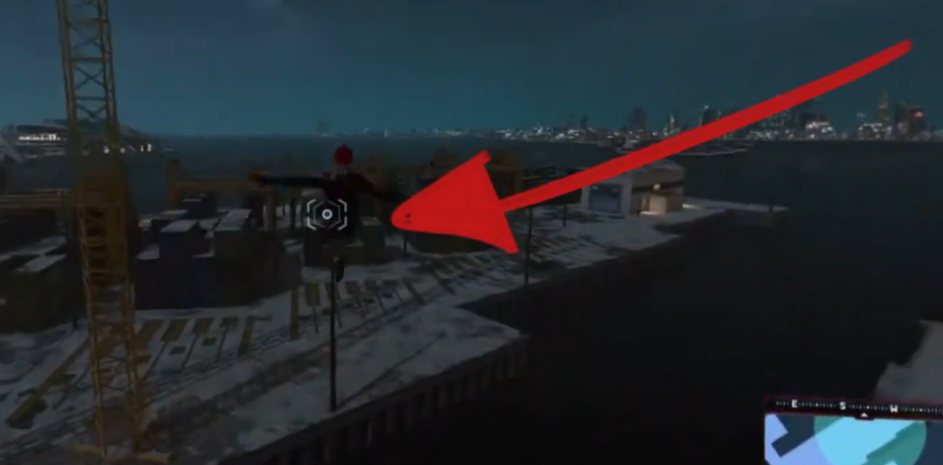
The Marvel Spider-Man Games use a lot of different techniques to inform the player’s mental model. For example, the environment itself leverages constraints to highlight when contextual actions are relevant. Such is the case with the zip-to reticle which is only visible when that action is possible.
The zip-to reticle never outstays its welcome.
But for the remainder of this video, I want to focus on how Insomniac games has brilliantly used the PlayStation 4 Dual Shock gamepad itself to inform our mental model.
Certain buttons own certain categories of behavior
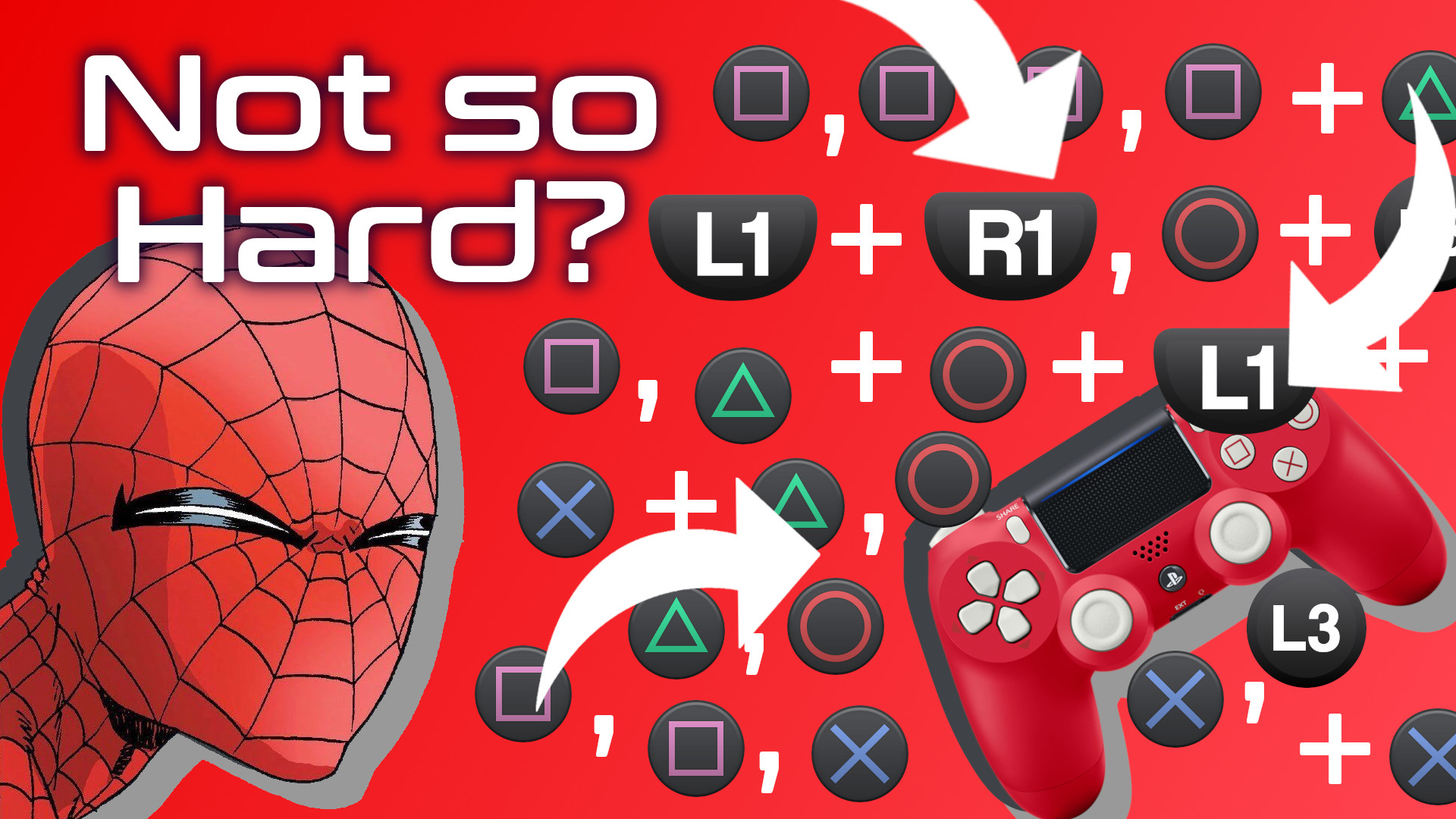
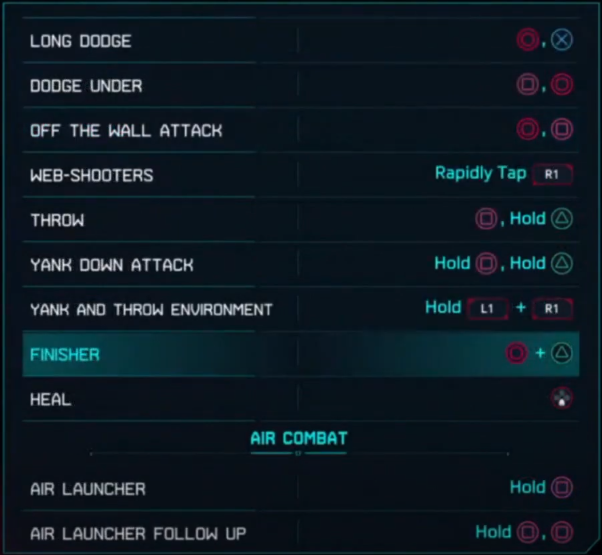
A player cannot be expected to remember every button action and combo through rote memory. Look, there are a lot of combinations. Pressing Square a bunch of times in a row is easy enough, but what about Circle then Cross or Square then Circle, and what about throwing L1 into the Square + Cross mix. On paper, it seems things could get quite complicated.
And this is just one a portion of the move set!
So how do they do it? In part, Insomniac games has designed button inputs to own categories of behavior. The player learns that the Triangle button, for example, is used to close gaps. Pressing triangle near an enemy will always serve some some of “gap closing” action, in one of the following ways:
by pulling the enemy close to Spider-Man
by pulling the enemy’s weapon close
by pulling Spider-Man toward the enemy.
The game never explicitly tells the player that the Triangle button can be thought of as a gap-closing button. Rather, the game simply tutorializes specific use cases, such as “tap Triangle to perform a web-strike.” And with consistent use and feedback, the player begins to intuit this gap-closing functionality, and once it becomes part of the player’s mental model, it becomes easier to understand how the Triangle button will impact other categories of behavior owned by other buttons. So matter what, if the triangle button is used in combination with another button, there will be some element of gap-closing. The player only needs to remember a button’s general domain, not every possible combination that uses that button. It’s pretty incredible what Insomniac has done.
This works for all of the face buttons. The Circle button is used for creating distance, most often as a dodge. The Cross button is used for jumping. The Square button is used for offensive maneuvers, mostly kicks and punches. And the L1 button is used to trigger special Venom powers. Therefore, as long as I have a general idea of what I want Spidey to do, I can do so consistently and confidently without having to rely on rote memorization.
And, since we’re on the topic of Venom powers, let’s explore the second way Insomniac uses the gamepad to inform our mental model.
Gestalt Theory
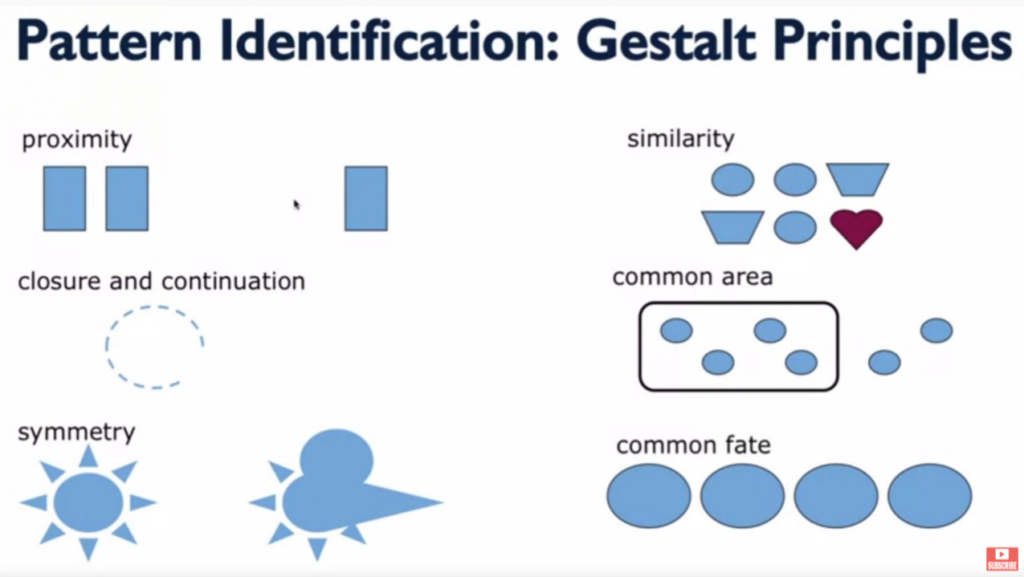
There’s a theory of design called Gestalt Theory which factors in six individual principles: similarity, continuation & closure, proximity, common area, symmetry, and common fate. Essentially, these principles help users understand the relationships between various elements.
What’s important for us is that the formal differences between buttons as well as the proximity some buttons have helps the player understand how those buttons work together or don’t work together.
Shoulder buttons, for example, are physically distant from face buttons, they are different shapes, and on some gamepads they have different textures. Gestalt principles of design clue the player into the functional differences of these button groups. Smart game designers lean into that mentality. They don’t fight against it. It’s also worth noting that the limitations of the human hand also factor into which buttons will own which functionality.
Human hands are great…but not that great.
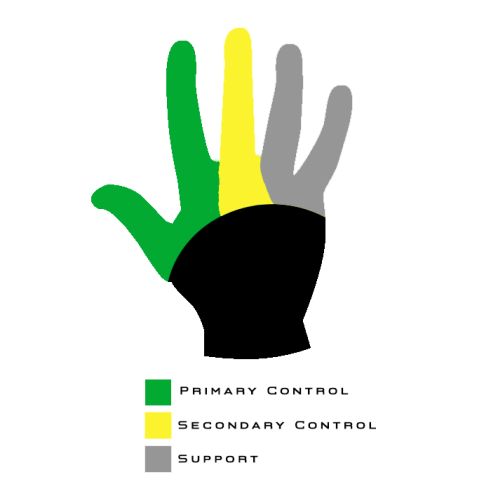
That’s why with Marvel Spider-Man Miles Morales the face buttons are the only buttons that affect Spider-Man’s positioning and hit-box, in most contexts. The shoulder buttons change the player’s perspective of Spider-Man or his appearance, but they don’t actually change his position, in most contexts. Similarly, the d-pad controls don’t move Spider-Man, rather they augment him in some way. Each group of buttons owns generally exclusive behaviors.
There’s also a balance that Insomniac has to maintain between honoring Gestalt principles and honoring the conventions that gamers expect. Thankfully, because smart designers have been designing smartly for years and because those designers likely know of Gestalt principles, there’s considerable overlap between what the player has come to expect based on playing lots of games and what Gestalt principles indicate the player probably expects.
Once the player’s mental model adapts to the understanding that face buttons function differently than shoulder buttons, and those in turn function differently than d-pad buttons, the player’s experience starts to feel intuitive. And remember, the game never explicitly tells the player about these functional categorizations. Smart design simply reveals it to the player. That’s incredible.
Lastly, and I’ll admit, this one is a bit of a stretch, the face buttons, the buttons that physically move Spider-Man most often, are anthropomorphic.
Anthropomorphic Button Layout
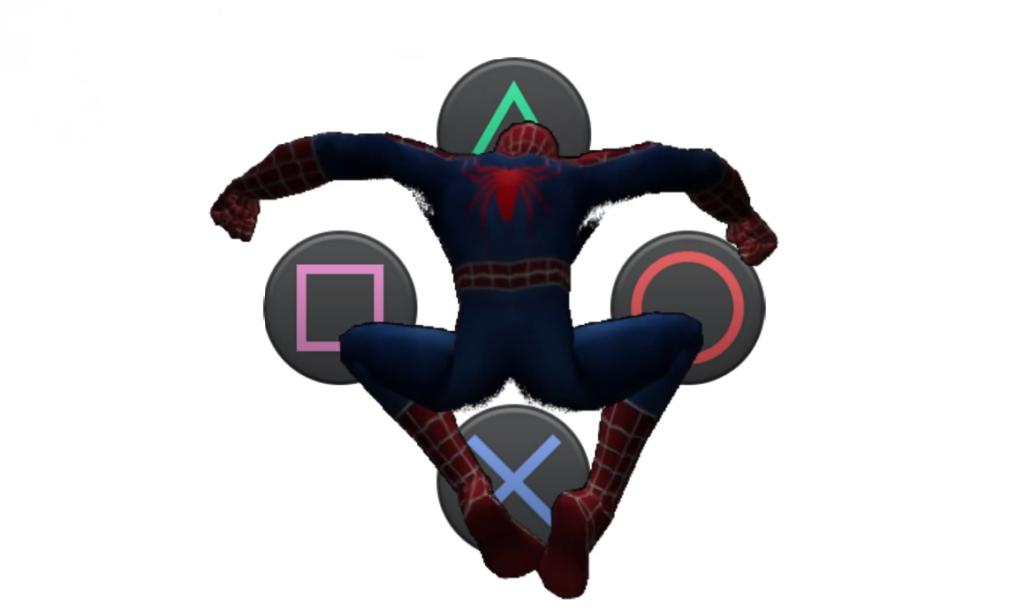
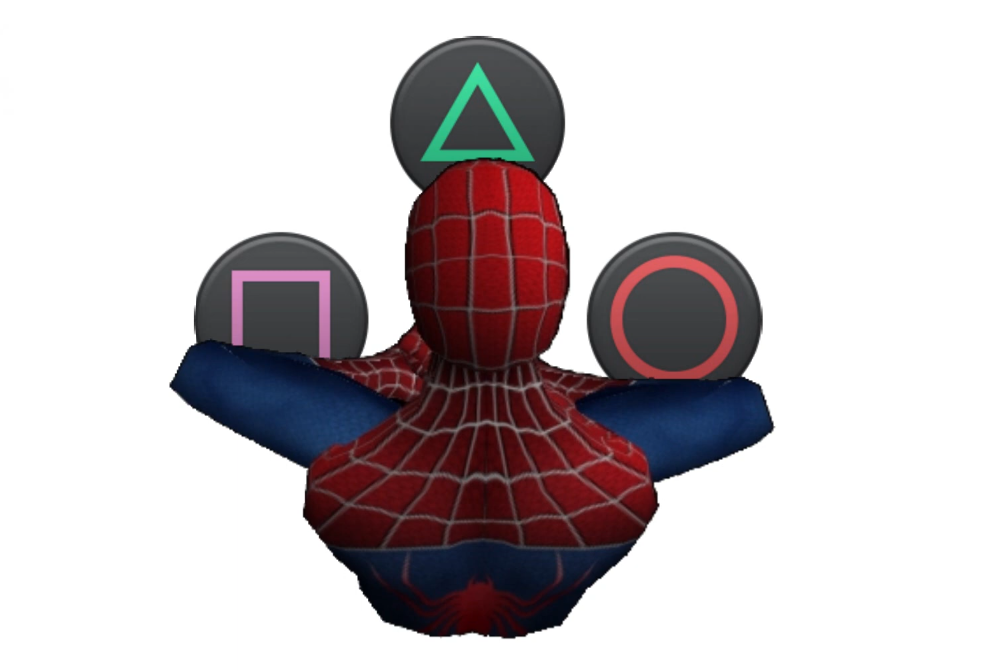
In other words, the face buttons take on the same human-like characteristics as does the human-like Spider-Man. Imagine this, you take the PlayStation 4 Dual Shock controller face buttons and overlay them with an image of Spider-Man. It would be reasonable, then, for a player to begin to understand the t-shape of the face buttons as mapping rather elegantly to the t-shape of a human body, or in this case the compressed, lower-case t-shape of spiderman perched on something. Through that lens, the cross button makes sense for an action that involves the feet, an action like jumping. Circle makes sense as a means for pushing Spider-Man away from the center axis of his body, much like a dodge would do. The Square button makes sense as a punch button specifically, but an attack button more generally, and the Triangle button, being at the top, makes sense as a means for bridging gaps, especially if you think of the face buttons from an overhead perspective, in which case triangle would be the button between Spider-Man and an enemy.
You can’t unsee it.See, the Triangle really is supposed to be a view cone.
And much like the Gestalt principles mentioned earlier, anthropomorphizing the face buttons has the added benefit of adhering to conventions. With PlayStation games, Cross is generally mapped to jump and Circle is generally a cancel button, and dodging feels like a cancel-style maneuver, as in I’m wanting Spider-Man to cancel out of whatever confrontation he’s in the middle of.
Like I said, that last method about anthropomorphizing the face buttons may be a bit of a stretch, but I think it makes sense. In fact, I dream of a day I could ask the designers at Insomniac games if there’s any truth to my hunch.
During a recent usability review playtest of an in-progress video game, I noticed something strange about the way the main menu registered gamepad inputs. This led me down an especially nerdy path to better understand what was going on.
I recently conducted a usability and gameplay analysis of an in-development game called Dungeon in a Bottle. It’s a 2D precision platformer and is absolutely delightful.
One focus of my analysis was the menu system. The developer, Very Handsome Games, called specific attention to the menu system as something they’d like me to take a look at. So I did. I look at things that people want me to look at. It’s who I am. It’s also why driving down a billboard-filled highway can be dangerous for me and any of my passengers. Billboards are meant for looking at.
When you’ve been playing video games with an eye toward usability for as long as I have, you start to intuit things on a gut level without having to rely on a checklist of usability heuristics. In the case of the Dungeon in a Bottle menu system, something felt a bit off. But I couldn’t articulate it, so I kept on with my play session. Later in the game, I noticed that a particular mechanic, called a Moth Jump, depended on button presses during specific intervals of time that, for some reason, perhaps my own ineptitude, I couldn’t quite land consistently.
The issue I found with the menu system is that when changing from one menu item to another using a gamepad it was possible, and actually quite common, to cycle so quickly through the menu options that landing on a specific option was difficult.
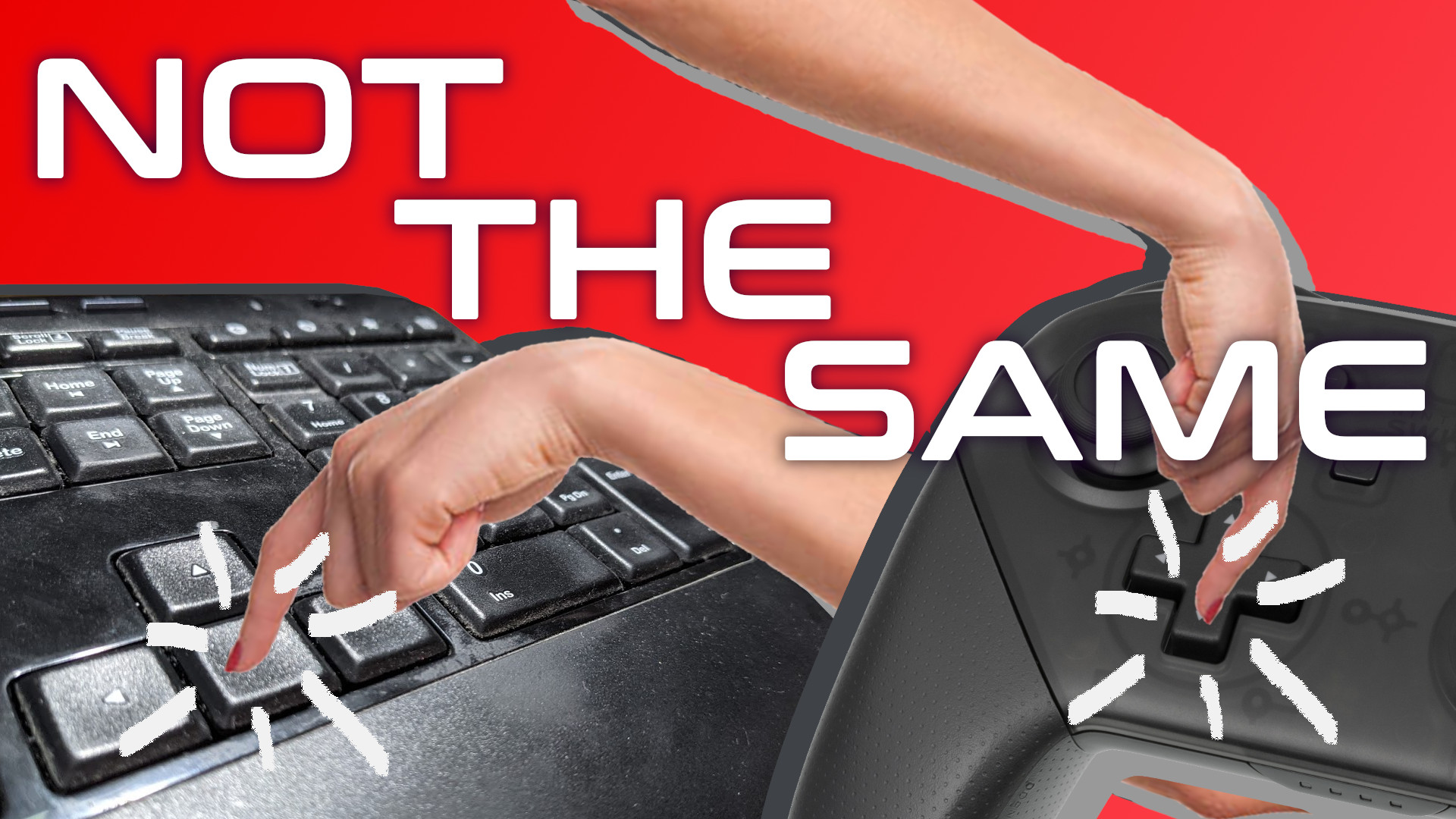
So, I had a theory worth testing: Are gamepad button presses less instant than keyboard button presses? Do players tend to hold gamepad button presses longer than keyboard button presses for the same objective?
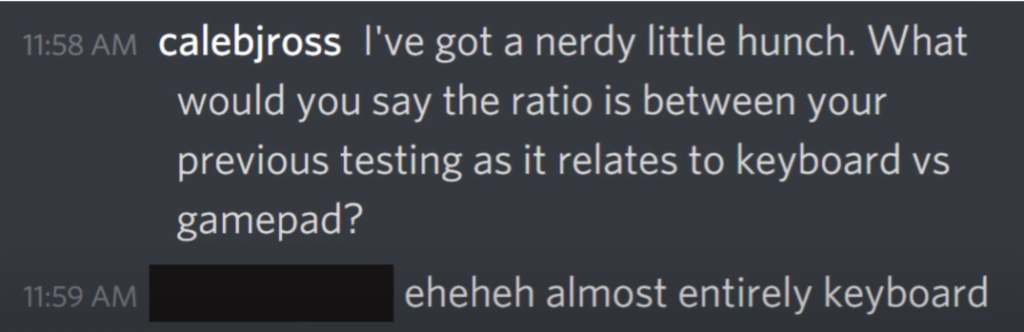
Well, first I wanted to better understand Dungeon in a Bottle’s own playtesting measures. I reached out to the developer and asked them to validate a hunch that the game’s testing so far had been focused on keyboard input. They validated this hunch. Nice.
Validation feels nice.
But a hunch alone wasn’t enough. I needed data. So, I mocked up a menu system to test this theory. I used a menu system both because that’s the situation that initially churned my gut, but also because it’s a testing environment that eliminates skill-based variables. I needed to remove as many variables as I could because I don’t have access to a fancy lab with lots of eager test participants. No, I have access to a smelly room and just three less than eager family members.
So, I have the test environment, I have the testers, and with a quick script to count frames during button presses, I have my data stream. Each session went like this: I had the player sit in front of the screen. I then instructed them to pick up the controller. I told them that the d-pad should be used for this test. I wasn’t testing how intuitive the interface was, afterall. I was testing for frame counts. So I felt comfortable directly telling the player how to navigate the menu. I then gave them a simple set of instructions to follow. For example, go down to the exit option. Now go up to the color option, now go back down to the exit option, and on and on until the player had pressed an average of 28 buttons. I then had them do the same for the keyboard.
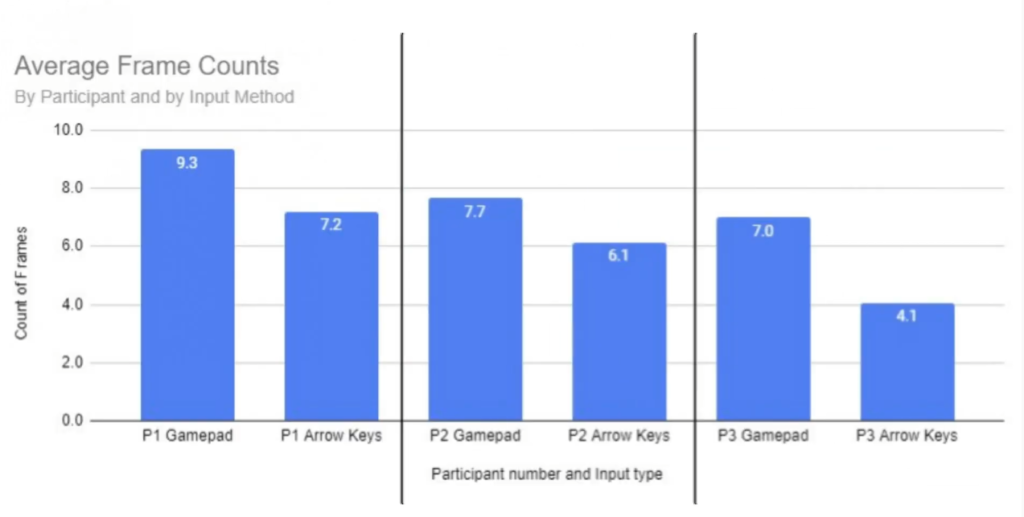
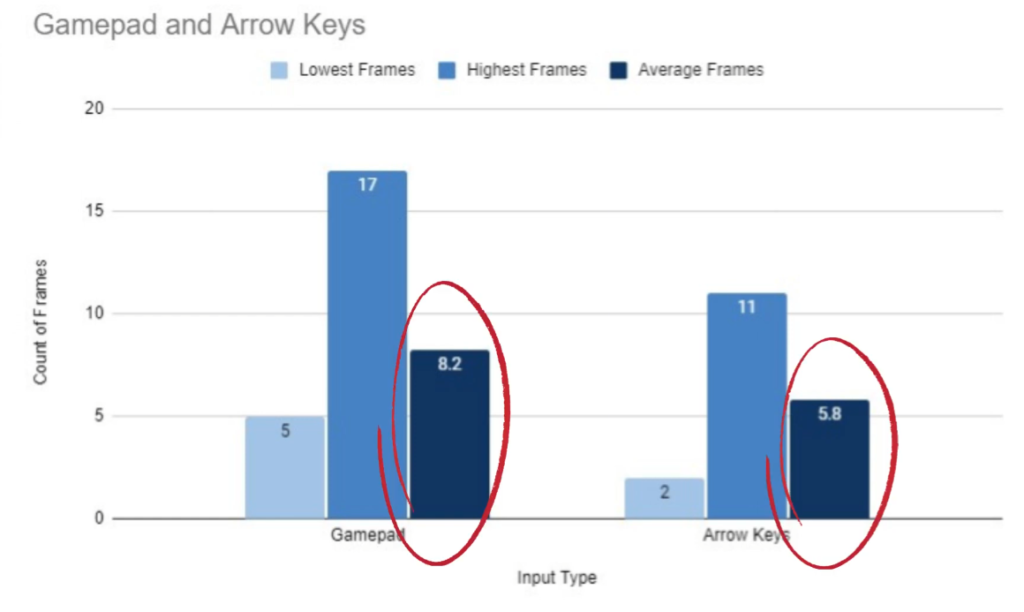
Afterwards, I had some data. Average frame counts are higher for gamepad button presses:
And this average is consistent even at the individual participant level:
Sure, this data isn’t enough to be statically valuable, but it’s definitely enough to add some credence to this idea that gamepad directional buttons tended to be pressed for longer durations than keyboard arrow keys.
Practically speaking, how is this useful? First, and perhaps most importantly, it means Bob’s thoughts about the “instant and satisfying” nature of keyboard button presses is valid from slightly more than just a subjective perspective. Second, it means that any coding in the game that relies on specific button states may need to take this input-based player behavior into account. Now, I have not talked with Very Handsome Games specifically about how they coded the game, so from here on out I’m only relying hypotheticals that could be applied to any game.
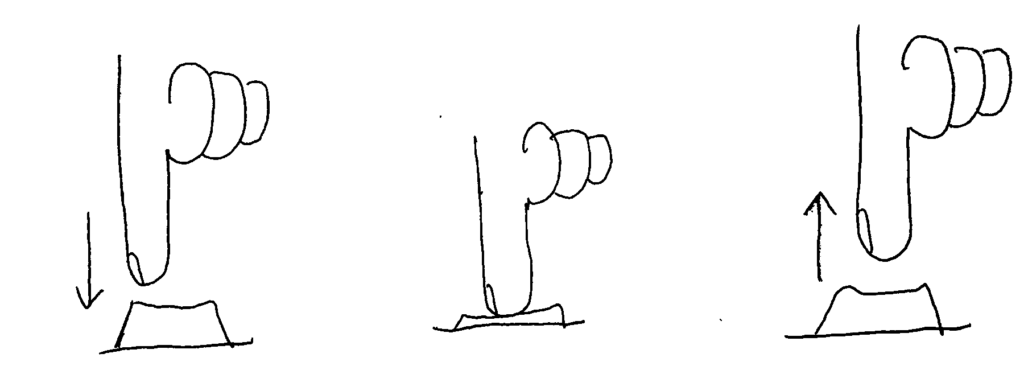
First, know that there are three states that a button can be in. In Gamemaker Studio 2, the engine that I’m most familiar with, these button states are:
check_pressed, which checks to see if the button has been pressed
check, which checks to see if the button is currently down
check_released, which checks to see if the button has been released
GameMaker Studio button states: _check_pressed, _check, _check_released
If cycling through the menu is based on the check function, then knowing that gamepad users hold buttons longer means that those players may inadvertently cycle past the desired option. Perhaps replacing this with the check_pressed function would be better, as this would allow the menu selection to advance only once per button press. However, for games with very long menus, this would force the player to press a button many times instead of just holding the button. Think the way Contra on the NES is way less problematic when using a turbo button. In this scenario, the check_pressed function is probably the right way to go, but some additional logic might be called for Perhaps the developer would want to incorporate a timer to allow the selection to advance only after a set number of frames has passed. According to the lowest frame count capture for a gamepad in my study, that number would be five frames. The developer could also have these rules be separate for gamepad and keyboard users if they really wanted to cater to specific gaming habits.
Overall, I’m really happy with this finding. Again, it’s not statically valuable, but it is incredibly interesting, to me at least, as it further helps me understand the differences between gamepad and keyboard inputs. Too often I think of the two interfaces as entirely preference based. I don’t think of them often enough as different in terms of functionality, at least not with games that are limited to very simple mechanics and few button requirements.
Have you ever played a game and, you wouldn’t say you’re having fun, maybe fun ish? The combat is adequately combatty. The environment is suitability environment-like. Even the story is appropriately narrative-ish. But despite all of the obvious important elements firing on just enough cylinders, something doesn’t feel right. Something isn’t quite working for you. Maybe, the game simply has poor usability.
What is Games Usability?
So, let’s begin with explaining what games usability is. It’s not the same as accessibility. Accessibility deals with making games playable by people with all types of impairments and disabilities, both temporary and permanent. Usability deals with making sure players understand how to play the game. Broadly speaking, accessibility is about the ability to play the game. Usability is about the ability to understand the game.
Games usability seeks to answer three questions about a game as the player plays it:
Does the player know what they have to do?
Is the player able to do what they need to?
Does the player know how to achieve their goals?
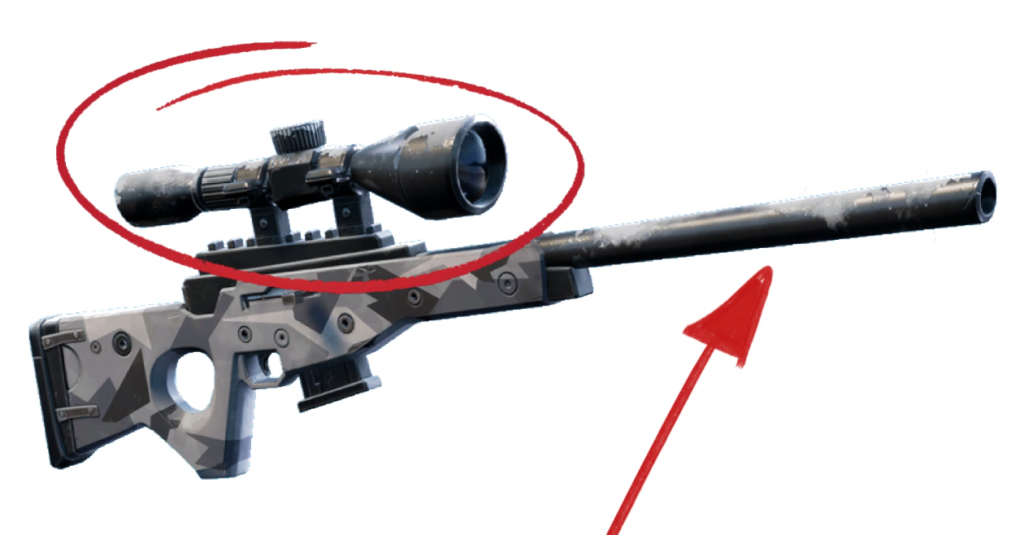
A usability reviewer might investigate these questions using usability heuristics, which are rules of thumb or guiding principles. For example, a game can benefit from using real-world equivalents to indicate in-game functionality. If I, as a player, see that a gun has a long barrel and big scope, I can understand that as probably a sniper weapon and therefore its functionality can be inferred. It’s a gun that’s slow to load but good at shooting long distances. Interestingly, conventions also fold into this concept. Even if a person has never seen a real sniper weapon, if they’ve played other video games with sniper weapons, they will still understand the functionality.
Probably long, slow shooty. Probably not short, fast shooty.
So, deviation from a heuristic could be enough to introduce a bit of friction between the player and the design intent of the game, that being how the game wants the player to feel and act. If the apparent sniper weapon turned out to be an automatic gun that fired mortar rounds, that would be weird. [1]Maybe awesome. But, still, weird. The player, though, might not immediately recognize this as inherently strange. Perhaps the game is set on an alien planet full of strange objects. But imagine this dissonance compounded over many hours of play with many different objects. The player may feel that something is off with the game.
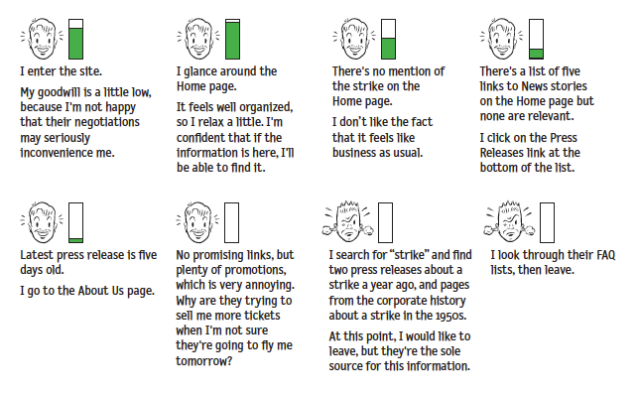
Steve Krug, in his book “Don’t Make Me Think,” introduced this idea of the reservoir of goodwill. This is the idea that users, or players in our case, will come to a game wanting to have a good experience. But each time the player experiences an issue that doesn’t make the experience great, the player’s reservoir of goodwill depletes until, if it reaches empty, the player quits the game. It’s more nuanced than that, of course, the player can build up a strong fault tolerance if motivated to continue playing through outside pressure, social pressure, emotional pressure, inertia, or simple potential (that eventual good feeling of seeing the platinum trophy pop), but the idea of usability as viewed through the reservoir of goodwill concept, can help explain the otherwise unexplainable reasons we have good enough experiences with a game instead of great experiences with a game.
The Reservoir of Goodwill by Steve Krug
But video games can, and I’d argue often should, stretch, or even destroy, the heuristics as long as game usability remains. Let’s talk about this using a very common design convention and heuristic pairing. The health status icon. Usability dictates that the player character’s health, in most games, should be shown to the player any time the player needs to make decisions based on the health, which is, in many games, always. The amount of health you have remaining determines pretty much every action in a lot of games. For me, someone who’s paranoid about sudden enemy attacks at every turn, if the amount of health I have remaining is ever less than 100%, my next action is to find more health.
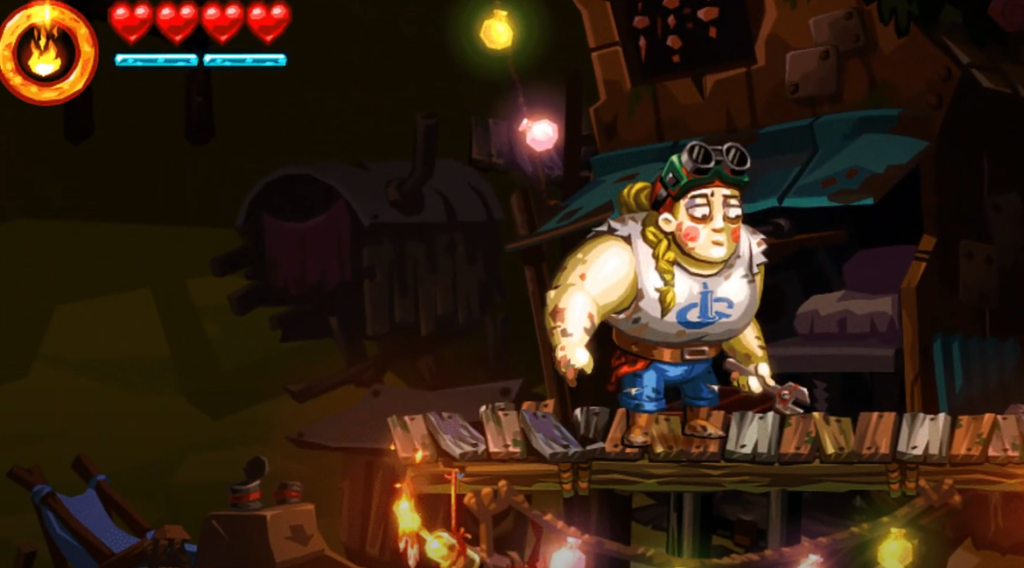
Therefore , a conventional way to display character health to the player is by using a series of heart icons or a health bar, sometimes red in color, and often a corner of the screen. This placement, shape, and color has become so ubiquitous that it’s jarring when health status meters, especially in action adventure and platformer games, don’t follow at least two of these conventions.
Yeah, that feels right.
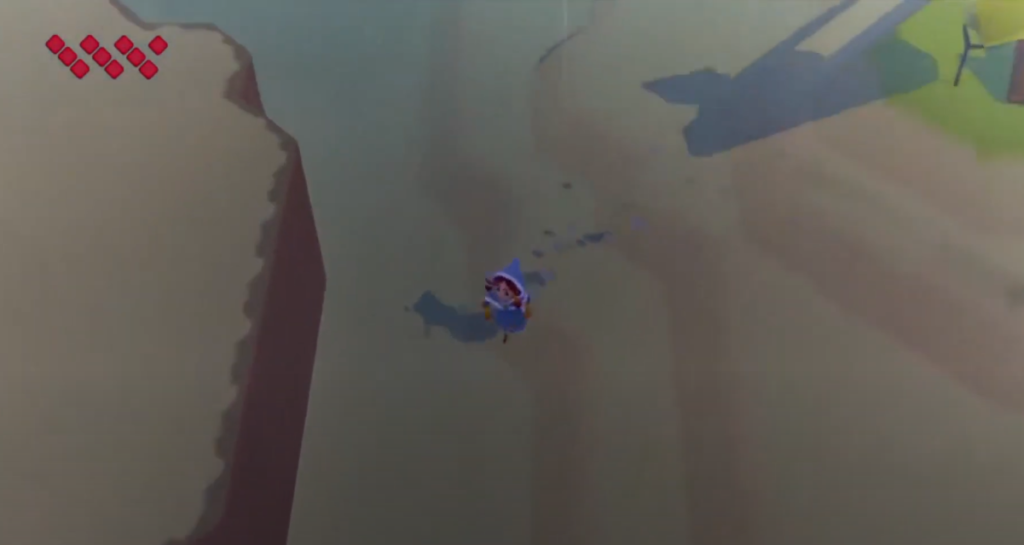
Sometimes designers will play with conventions. World to the West, a fantastic top-down Zelda-like game, honors the color and placement conventions of the health status meter, but instead of using a common shape like a heart, circle, or a bar, World to the West uses a series of diamond shapes organized in sets of three. I admit, when I first started playing, I was a bit confused. I knew the element reflected character health, but I wasn’t sure why they were laid out like they are. Why in angled stacks of three? Ultimately, this layout had no gameplay purpose, but my confusion is worth noting as it shows just how powerful conventions can be.
Nope. That’s weird.
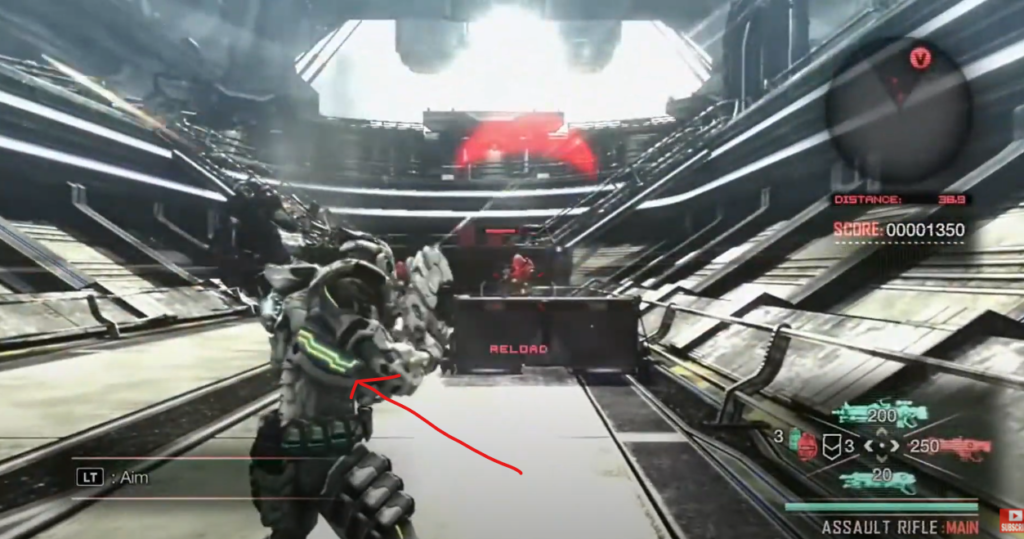
Then, take a game like Vanquish, a third person action shooter with…a very, very atypical health status meter. The health system uses a recognizable green-yellow-red color indicator to connote full health, medium health, and low health, respectively, which is good, as the color scheme is well-known by way of most real-life traffic light systems. However, the placement of the health status meter is confusing. In fact it’s so confusing, many players have had to ask online how to even find where in the game the player character’s health status can be seen. In Vanquish, the player has to look at the player character’s suit, either at the player character’s helmet, back, or calf. All three placements are usability nightmares because they are not always in the same place, are often obscured, are hard to intentionally make visible, and making them visible compromises other systems in the game–as in, moving the camera around to view the health may mean the player isn’t able to see enemies.
This health system status element is something that, if I were part of the development team, I would have argued for a playtest or usability review as soon as this idea made its way to the corkboard.
If I have to point it out with an arrow, it is bad.
The further a designer strays from conventions, the more they have to justify those though gameplay. Conventions are great ways to get players to focus on what a designer wants a player to focus on. People don’t have infinite ram to store every pixel and every system function in their brain. Conventions are very useful shortcuts to allow game designers to experiment and create where experimentation and creation can thrive. And sometimes, a game like Vanquish tries something new and it’s not until years later that I look back and realize, oh yeah, the health system sucked and that definitely, though subconsciously, influenced my decision to thrown that game in the trashcan.
There are probably not many facets of video games more contentious than the cutscene, the short, or sometimes very long, scripted cinematic scene that, from the player’s perspective, is either a necessary piece of emotional connective tissue keeping the player tethered to the narrative or just an unwanted speed bump along a highway otherwise filled with hi-octane action. The ham-fisted solution to these opposing views is to give players the ability to skip the cutscene. Players who want it can have it. Players who don’t want it, can leave it. But as with all things related to usability, the design intent and the player perception must be taken into account. Not to mention, developers must consider the technical implications of modifying cutscene behavior. It’s not as easy as cutting out the scene.
Player Perception on a Skippable Cutscene
First, let’s look at the player perception angle. If given the option to simply skip all cutscenes, players may perceive that the cutscenes aren’t important, and therefore their confidence in the game’s design direction is compromised. Their reservoir of goodwill starts to deplete. Alternatively, a skipped cutscene could lead to confusion about the game’s narrative, which also could reduce player confidence in the game’s direction. The thinking would go, “why would a designer include such an intrusive yet ignorable element?” There’s some dissonance between what the game wants of the player and what the player thinks the game wants of the player.
Technical Reality of a Skippable Cutscene
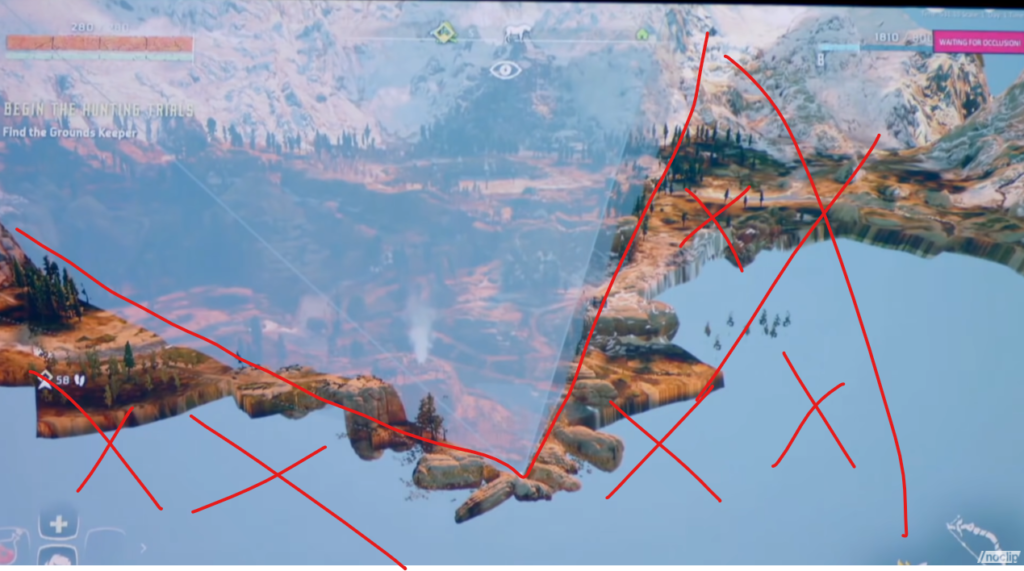
But, skippable cutscenes, beyond just being potentially bad in practice, isn’t even possible in practice, much of the time. Video games are all smoke and mirrors, They’re just an hours long magic show where rocks are hollow and the world outside your narrow vision cone simply doesn’t exist. Cutscenes are just another pawn in the birthday party magician’s sack of tricks. For example, cutscenes are sometimes used to keep the player engaged as the game loads. In this case, they simply cannot be skipped, at least not until a certain amount of the game has been streamed in.
Horizon Zero Dawn: What’s outside the vision cone does not get rendered.
So if unskippable cutscenes can possibly cause player frustration. And skippable cutscenes can possibly cause player frustration. And cutscenes that are skippable midway through can possibly cause player frustration. What’s the solution? The obvious solution is to create cutscenes that are so captivating that a player happily watches them. But that’s not a reality. Different things captivate different players in different ways.
Games Usability and a Skippable Cutscene
First, we have to understand a bit more about how cutscenes impact game usability. Players should always be able to perceive that the system, the game, is functioning. Loading spinners, or throbbers, are a good example of this. Cutscenes can be problematic because they can reduce this transparency. These days games can look so good that players may not know a scene is a cutscene until they try to skip it. So, why not add a loading spinner. For aesthetic reasons, these types of cutscenes that mask game streaming likely shouldn’t have a giant loading spinner in the corner.
An example of a loading screen spinner/throbber. You’ll just have to trust me that the ring in the corner is spinning.
Perhaps game designers can leverage conventions from other, familiar interfaces. Google’s material design uses a determinant linear progress indicator which is fairly unobtrusive and could make for a good game loading indicator at the bottom of a cutscene. But I’m a games usability guy. I’m not a designer.
A determinant linear progress indicator
One way some designers have attempted to address this dissonance is to provide feedback when an impatient player presses a button in an attempt to skip the cutscene. Sometimes designers flash an “unable to skip cutscene” indicator. This works because it tells the user that the system is functioning but that they have to wait a bit. This gets even more potentially frustrating for players when games sometimes allow cutscenes to be skipped and sometimes don’t. The inconsistency causes unnecessary friction. I’d argue it would be better if the player knew why they were unable to skip the cutscene. Maybe “Game Loading. Unable to skip cutscene.”
What if the cutscene is story relevant, and therefore possibly essential to the designer’s intended gameplay experience? How do you force a cutscene while also giving the player freedom? It’s a tough call, but ultimately designing around player freedom is probably the way to go. I’ve seen some games handle this by including summarizing banter between characters immediately following a cutscene. In cases where the player character has an NPC companion that was featured alongside in the cutscene, the two could comment on the content of the cutscene as the player is moving the character toward their next goal once the cutscene has passed. This way a cutscene-hater can still get the gist of the narrative, enough at least to stay invested. Good game design also reinforces recognition rather than relying on player recall. In our case, this could mean that mission names and descriptions are robust enough that a player need not watch a cutscene.
In the early days of cutscenes, fully rendered cutscenes, rather than in engine cutscenes were all the rage. Sure they were visually jarring to the player, but we largely didn’t care because “holy crap that looks real!”. But they were impressive from a technical perspective. Not only that, but I argue they also were helpful from a usability perspective, in a strange way. The unlikely benefit to this visual incongruity between polygon-filled gameplay and smooth-rendered cutscene is that players easily understood that cutscenes were different, they looked way more impressive than the gameplay, and therefore players understood, even without overt feedback, that different rules were at play. The inability to skip a cutscene made intuitive sense. Also, remember that rendered cutscenes were still new, so many players didn’t want to skip the cutscenes because, “holy crap that looks real”.
Yes, actual gameplay looked way worse than this cutscene in 1996.
But now with most cutscenes happening in-engine, the visual fidelity alone between gameplay and cutscene isn’t different enough for players to let game designers get away with forcing us to watch the cutscenes, at least not without a system status indicator of some sort. It is true that the cinematic nature of cutscenes sometimes still project a sense that the rules of the game are different, but I’m not confident that’s enough.
All of this may be moot soon though now that two of the three major consoles have SSD drives. The much faster data streaming capabilities with SSD drives means cutscenes may not be required for hiding loading screens anymore. This is a shame to me, as I personally enjoy most cutscenes, but the beneficial trade-off is that if game designers do include a cutscenes in a world in which loading is so quick it’s essentially imperceptible, I’ll know that the cutscene is intentional and for narrative purposes. And so, as a player, I’ll have greater confidence in the design direction of the game. Seeing a cutscene will be like seeing a rug in your neighbor’s living room and knowing it’s there because it actually brings the room together and not because it’s hiding a vomit stain from that time when Frank’s aged tuna salad culinary experiment turned out exactly as you’d imagine it would.
For a long time I’ve considered button prompts in video games to be an element of lazy game design. “Shouldn’t a well-designed game give players a play space so rich with affordance and feedback that players would frictionlessly and joyously discover the game mechanics and their associated inputs?” Not only did I think this, but I thought game designers were pretty universal in the idea; if button prompts can be eliminated, then shouldn’t it be done?
But on episode 55 of the podcast “Play, Watch, Listen” Bithell dismissed the inherent goodness of an absent UI, saying it’s really just an aesthetic choice. I was surprised by this, because Mikey B is an awesome game designer and I had simply assumed every game designer would eliminate overt button prompts if they were capable enough.
So in this video I talk about how Mike Bithell helped me rethink user interface design, specifically in regards to on-screen button prompts. Thank you, Mike Bithell.

 And this average is consistent even at the individual participant level: